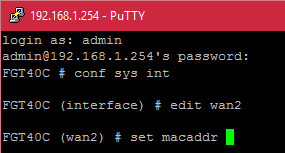
 I was recently out at a client and they were in the process of getting another link installed, which happened to be Cable internet which they were using for redundancy. We put their cable modem in Bridge mode but the connection wasn’t coming up after connecting everything up. Most cable providers authenticate with certificates and the hardware address of the router so this made me thinking that we needed to make their provider think the FortiGate was their original modem. So firing up an SSH session I logged in and issued the following commands;
FGT40C # config system interface
FGT40C (interface) # edit wan2
FGT40C (wan2) # set macaddr xx:xx:xx:xx:xx:xx
FGT40C (interface) # end
Now you will want to replace the interface, in this case wan2 with your interface and the mac address with the hardware address you want to spoof or mimic.
I gave the cable modem a power cycle for good measure and the connection came up.