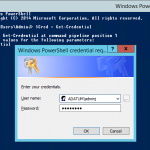
 I had a VM snapshot/checkpoint running for several months in my test lab and after reverting the snapshot back I went to login to the machine and got the dreaded Trust relationship between this computer and the primary domain failed error message. So I logged in as a local admin onto that machine, opened up an Administrative PowerShell window and entered the below commands.
$cred = Get-Credential – (enter domain admin account when prompted)
Reset-ComputerMachinePassword -Credential $cred -Server ada-dc-02.adatum.com.au
Replace the server at the end with a FQDN of one of your Domain Controllers. As I wasn’t authenticated to the domain, I needed to enter my domain admin credentials by using the Get-Credential cmdlet and then using those stored credentials to issue the Reset-ComputerMachinePassword cmdlet.
So there you have it, no more re-joining a computer to the domain.