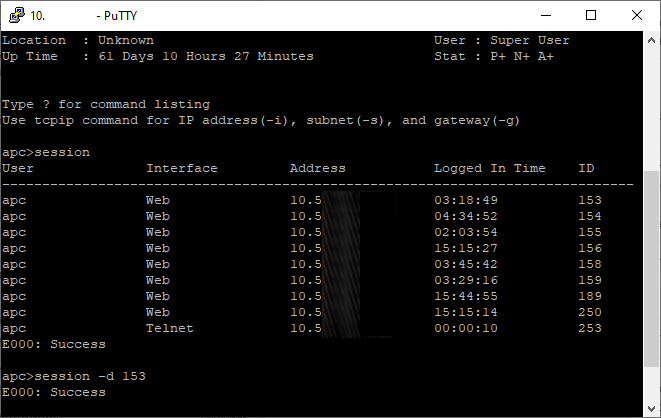
 I was trying to log into an APC UPS with the correct login but still received an error, The maximum number of web connections has been reached or simply Maximum connections reached. Knowing I had the right login credentials, and that no one else was logged into, I was a little perplexed. There is a straight forward fix but can be a little annoying.
Open up your favorite SSH client and connect via SSH to the APC or Schneider Electric Network device. Login using the configured username or password, or default of apc and apc. Once logged into the console, we’ll issue some commands to list the current sessions and then use the -d switch to “disconnect” a few. I’ll point out the last session via Telnet is usually you so don’t disconnect it.
session

session -d 153
Commands are based on the image, simply change the session number to suit. Once you have cleared all the commands, you should be able to login to the web interface without issues.
Thanks for an informative blog