For our new roll out next year, we are deploying Microsoft Office 2010 and using KMS as our licensing method. Througthe use of sysprep’s generalize command, Windows will flush its Activation Status and associated hardware ID as well as rearming the activation state to its fresh install state (grace period).
With the introduction of Office 2010 brings improved piracy protection. On our test deployment we found that our KMS Client count for Office 2010 wasn’t increasing and therefore wouldn’t reach the required count of 5 for activation, what was going on! After a little bit of digging and the use of the Office 2010 Software Protection VB Script (ospp.vbs under the Office14 folder) we were able to see that the five of our test machines had the same CMID, therefore KMS thought that each was the same client. After a quick look through Technet we found out the issue. When you run an Office Product it would automatically attempt to activate via KMS. Our Office installer also had its own activate upon installation command as well.
The fix for this issue and getting the count to increase (and finally activate) was to run a re-arm utility provided under program files (or program files x86, depending on your installed flavor):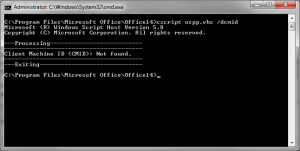
C:\Program Files\Common Files\Microsoft Shared\OfficeSoftwareProtectionPlatform\ospprearm.exe
Running the utility under an elevated command prompt will then show completed successfully. If you wish to double check you can then run ospp.vbs with the /dcmid switch and find that there is now no Client Machine ID.
Once this is compelte, run your sysprep as you would and you will find that for each client that you activate from now on for your KMS will increase your count. You will also find that if you have some clients with the same ID then they will also all activate.
I plan on having some other articles covering articles regarding Windows 7 sysprep so stay tuned.
Thx a lot!!!!!!!!
I had this problem and I search for days to get this fixed.
Thx again 🙂
Spot on with this write-up.